

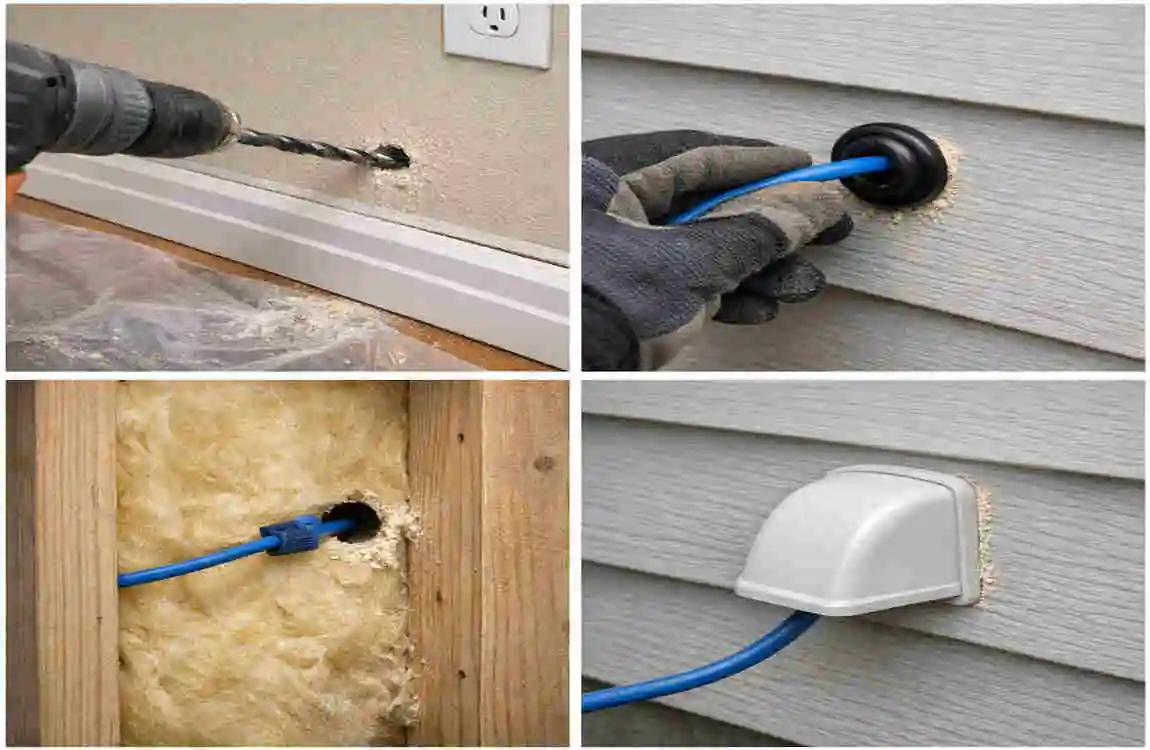
Sometimes Wi‑Fi is just not enough. If you need a stronger connection for a home office, garage, workshop, security camera, access point, or another building, running Ethernet through an exterior wall can be a smart fix.
If you are looking for how to run an Ethernet cable through an exterior wall, the main idea is simple: plan carefully, protect the cable, seal the opening, and ensure the installation is safe.
A wired Ethernet connection is usually more stable than Wi‑Fi. It can give you higher speeds, lower latency, and fewer dropouts, which is especially useful for work, gaming, streaming, or devices that stay in one place.
The good news is that this is a DIY project many homeowners can handle. You need the right cable, the right tools, and a little patience.
How to Run Ethernet Cable Through Exterior Wall
Plan the Cable Route
Start by asking two simple questions: Where is the connection starting? Where does it need to end?
Choose the shortest practical route, but do not force the cable through sharp corners or awkward bends. Add a little extra length so you have room for connection and adjustments.
Try to think ahead, too. If you may need to replace or upgrade the cable later, make the route as accessible as possible.
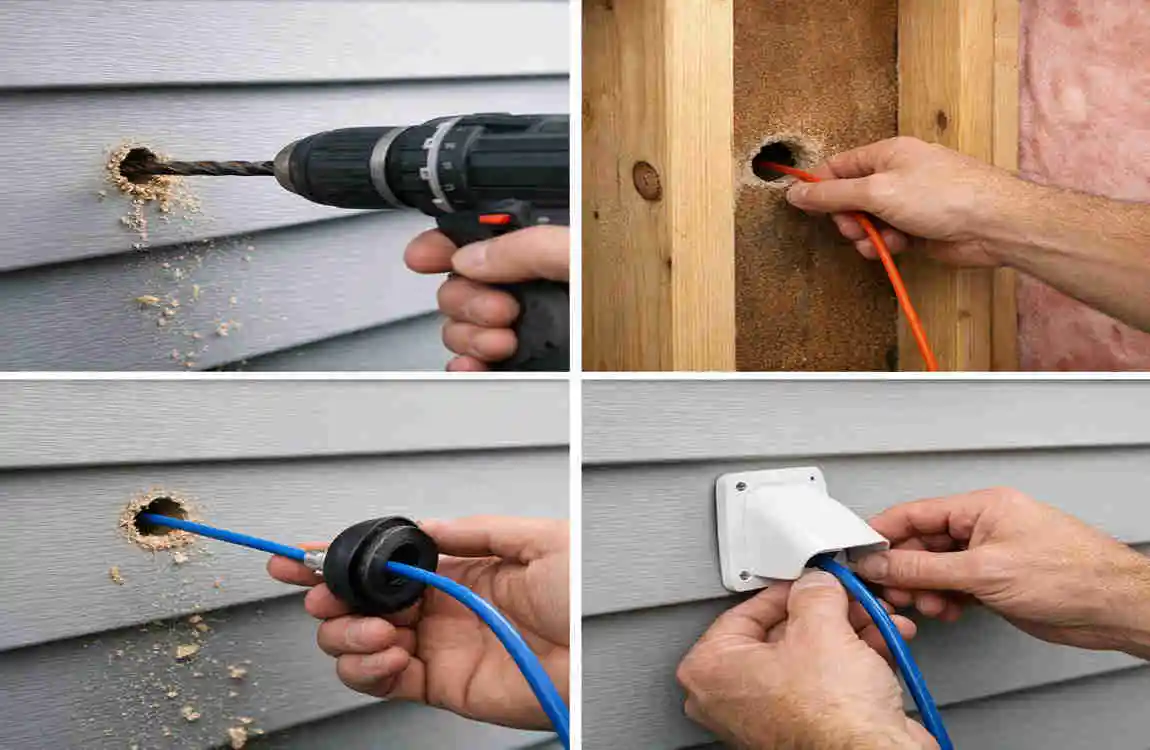
Drill the Exterior Wall Carefully
Use a drill bit that matches the cable size and the wall material.
Wood, brick, concrete, and stucco all need different handling. Do not rush this part. A fast, careless drill can damage siding, insulation, plumbing, or wiring.
Keep the opening as small as practical. A hole that is too large makes sealing harder later.
Feed and Protect the Ethernet Cable
Once the hole is ready, pass the cable through slowly.
Use a grommet or bushing so the sharp edge of the wall does not cut or wear the cable jacket. This small part is important for safety and durability.
Do not pull too hard. Ethernet cable can be damaged if it is crushed, twisted, or bent too sharply.
Seal the Wall Penetration
Sealing is one of the most important parts of the job.
Use an exterior-rated sealant around the opening to block rain, moisture, drafts, and insects. If the wall entry is not sealed properly, water can get in and cause bigger problems later.
Make sure you do not trap water in the wall or block any drainage path. Both the inside and outside of the hole should be properly protected.
Exterior Ethernet Installation Safety and Weather Protection
Protect the Cable From Weather
Outdoor conditions can wear down cable over time.
Sunlight, rain, heat, cold, and moisture all affect Ethernet cable. That is why indoor cable should not be used where it will sit outside for long periods.
Also, keep the cable away from places where lawn equipment, cars, pets, or foot traffic can hit it.
Maintain Safe Separation From Electrical Wiring
Ethernet is low-voltage, but it still should be kept away from electrical hazards.
Do not drill into a wall unthinkingly. Always check what is behind the surface first. If the path is near electrical wiring or a complicated panel area, it is safer to get professional help.
Avoid Excessive Bending and Pulling
Ethernet cable should not be bent too tightly. Sharp bends can hurt performance and may break the cable inside without any obvious damage on the outside.
Use the bend radius recommended by the cable maker. Also, avoid pulling so hard that the wire stretches or twists.
Consider Grounding and Surge Protection
Outdoor cable runs are at risk of surges, especially if the line runs between separate buildings.
In some cases, surge protection is worth adding. If your setup is long, exposed, or near electrical hazards, talk with a qualified electrician or networking professional.
Connecting, Testing, and Troubleshooting the Ethernet Run
Terminate the Ethernet Cable Correctly
At each end, you will need to finish the cable with the correct connector or wall jack.
The wiring must follow the same standard on both ends. If the termination is wrong, the connection may fail or work poorly.
Keep the twisted pairs as close to the termination point as possible. That helps preserve signal quality.
Test the Cable Before Finalizing the Installation
A simple cable tester can save you time and frustration.
It can help you find:
- bad wiring
- open connections
- short circuits
- connector problems
Test the cable before you fully seal it or hide it in hard-to-reach areas. A cable may look fine but still fail electrically.
Troubleshoot a Weak or Unstable Connection
If the connection is not working well, check the basics first:
- Inspect both connectors
- Look for sharp bends or crushed sections
- Test the cable again
- Check your network equipment speed support
- Replace weak connectors or damaged cable
Do not keep troubleshooting the same bad section if the cable may already be damaged.
Common Mistakes to Avoid When Running Ethernet Through an Exterior Wall
Using Indoor Cable Outdoors
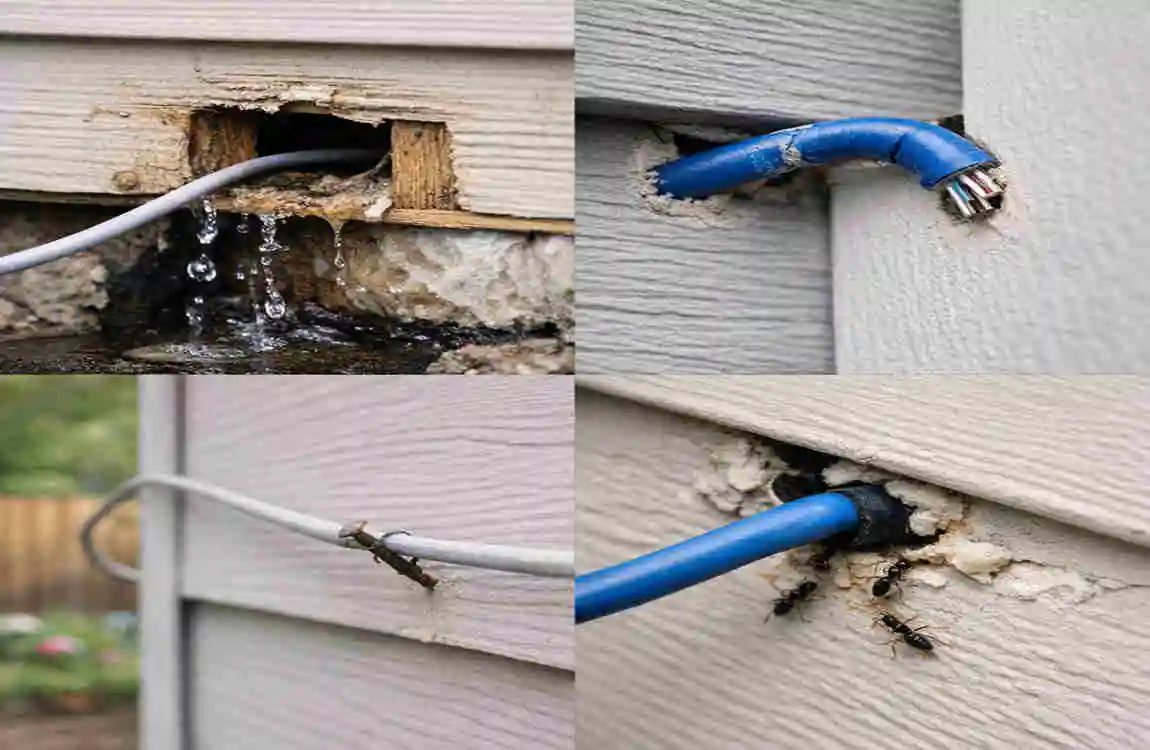
Indoor cable is not built for long outdoor exposure. It may crack, fade, or weaken over time.
Always choose cable that matches the environment.
Leaving the Wall Opening Unsealed
An open hole can let in water, drafts, and pests. Even a small gap can become a big problem later.
Drilling Without Checking for Hidden Utilities
This is one of the most dangerous mistakes. Always check for wiring and plumbing first.
Making the Cable Route Too Long
Long, messy runs are harder to manage and can look unclean. Plan the route before cutting the cable.
Crushing or Over-Bending the Cable
Physical damage can hurt speed and reliability. Use gentle bends and proper supports.
Skipping Cable Testing
Testing before finishing the project can save a lot of time and repeat work.
FAQ About Running Ethernet Through an Exterior Wall
How do I run Ethernet cable through exterior wall?
Plan the route, inspect the wall, drill the right-sized hole, protect the cable with a grommet, run the cable, and seal the opening with exterior-rated sealant.
Can I run regular Ethernet cable through an exterior wall?
You should not leave regular indoor cable exposed to outdoor conditions. Use outdoor-rated cable for any outside section.
How do I seal Ethernet cable through an exterior wall?
Use a suitable wall entry fitting or grommet, then seal around it with exterior-grade sealant matched to the wall material.
Can Ethernet cable be run outside the house?
Yes, but it should be outdoor-rated and protected from weather and physical damage.
Is it safe to drill through an exterior wall for Ethernet?
It can be safe if you check for wiring, plumbing, and structural parts first. If you are unsure, call a professional.
Does running Ethernet through a wall reduce internet speed?
A proper installation should not reduce speed on its own. Performance depends on cable quality, length, terminations, and equipment.
| Topic | Simple Tip |
|---|---|
| Choose the Route | Pick the shortest, safest path through the exterior wall. |
| Drill the Hole | Use a drill bit suitable for the wall material and cable size. |
| Protect the Cable | Add a weatherproof grommet or conduit to prevent damage. |
| Seal the Opening | Use exterior-grade sealant around the cable to block water and drafts. |
| Avoid Utilities | Check for electrical wires, plumbing, and other hidden services before drilling. |
| Use Outdoor Cable | Choose weather-resistant Ethernet cable rated for exterior use. |
| Secure the Cable | Fasten the cable neatly without crushing or sharply bending it. |
| Test the Connection | Connect and test the Ethernet line before finishing the installation. |
